If you're planning to build a CRM, admin panel, or custom Laravel backend, the quality of your preparation will matter more than which developer you choose.
I've worked on CRMs, REST APIs, HRMS tools, and business platforms for several years. The projects that run smoothly almost always share one thing: the client had clarity before development started. The painful ones usually didn't.
This post isn't a sales pitch. It's the checklist I wish more clients had before our first conversation — because when you come prepared, you get better estimates, fewer surprises, and a product that actually fits your business.
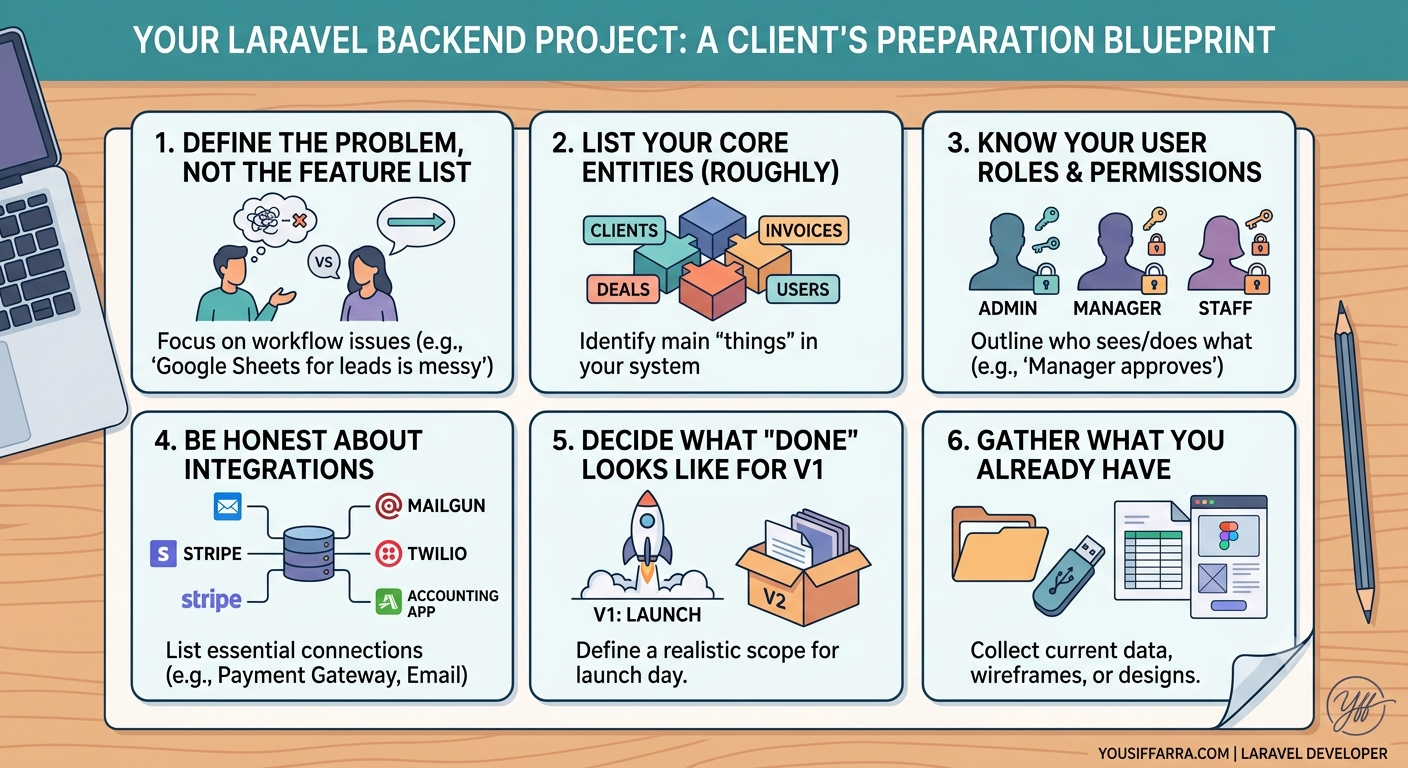
1. Define the problem, not the feature list
Don't start with "I need Laravel, MySQL, and a dashboard."
Start with:
- What problem does this solve?
- Who uses it daily?
- What are they doing today without your app? (Excel, WhatsApp, paper, another tool?)
Example of a weak brief: "We need a CRM with clients, invoices, and reports."
Example of a strong brief: "Our sales team tracks leads in Google Sheets. We lose follow-ups, duplicate entries, and have no visibility on who contacted whom. We need one place to manage leads, assign them to reps, and see status at a glance."
The second version tells a developer what to optimize for — even before features are listed.
2. List your core entities (even roughly)
You don't need a perfect database design. But naming your main "things" helps a lot:
- Clients / Companies
- Leads / Contacts
- Deals / Orders
- Users / Roles
- Invoices / Payments
A simple bullet list is enough for an first call. If you can add one line per entity ("A Lead becomes a Client when they sign"), even better.
This is often the fastest way to expose gaps in your thinking early — before they're expensive to fix in code.
3. Know your user roles and permissions
Almost every CRM or backend app needs roles. Think about:
- Admin — full access?
- Manager — sees team data only?
- Staff — sees only their own records?
- Client — login to a portal, or internal only?
You don't need every permission mapped on day one. But if you say "managers should approve things staff can't," that's already useful.
Unclear permissions are one of the top reasons backend scope grows mid-project.
4. Be honest about integrations
Write down anything the system must connect to:
- Payment gateways (Stripe, PayPal, local providers)
- Email (SMTP, Mailgun, SendGrid)
- SMS or WhatsApp APIs
- Accounting software
- Existing website or mobile app
- Legacy spreadsheet or old database
Also note what can wait for v2. Not everything needs to ship in the first release — but hiding integrations until week three of development is how timelines break.
5. Decide what "done" looks like for v1
Scope creep kills backend projects.
Ask yourself:
- What must work on launch day?
- What can wait 30–60 days?
- What's nice-to-have but not essential?
A realistic v1 for a CRM might be:
- User login + roles
- Lead management (create, assign, status)
- Basic search and filters
- Simple dashboard
Reports, automation, mobile app, advanced analytics — often v2.
The clearer your v1, the more accurate your quote and timeline will be.
6. Gather what you already have
Before hiring, collect whatever exists:
- Wireframes or Figma designs (even rough)
- Old spreadsheets or sample data
- Brand guidelines
- Domain/hosting details
- Any existing code or partial build
- Competitor apps you like (and why)
You don't need everything perfect. But "here's our current Excel file with 200 real rows" is worth more than ten pages of vague description.
What happens when you come prepared
When a client sends me a clear brief, I can usually reply within 24–48 hours with:
- Whether Laravel is the right fit
- A rough approach (architecture, main modules, risks)
- Questions that still need answers
- A realistic next step: discovery call, fixed quote, or phased plan
When the brief is vague, the first week is mostly guessing — and that's billable time neither side enjoys.
Red flags to watch for (on both sides)
As a client, be cautious if a developer:
- Quotes a fixed price without asking about roles, integrations, or data
- Never asks about your existing workflow
- Promises "anything" in two weeks
As a developer, I'm cautious when:
- There's no decision-maker available
- Scope changes every meeting but the deadline stays fixed
- "We'll figure out the logic later"
Good projects need collaboration, not just code.
Final thought
You don't need a 50-page specification to hire a Laravel developer. You need enough clarity to answer: who uses this, what problem it solves, what v1 includes, and what connects to the outside world.
If you're at that point — or close — you're ready to have a productive conversation.
If you're planning a CRM, API, or Laravel backend and want help scoping it, get in touch through my hire page. I review every request personally and reply within 24–48 hours.